January 14, 2026·8 min read
This is Part 2 of the Platform AI series. Part 1 covers building the basic chatbot with Claude API and Cloudflare.
Most AI assistants answer questions. This one executes actions. Platform AI is an agentic assistant built into my blog that can query live cluster status, start and stop AKS clusters, and handle infrastructure operations, all through natural conversation.
Live: https://chrishouse.io/tools/ai
What It Does
Platform AI is a specialized DevOps assistant that goes beyond answering questions. It can query real-time power state, node count, and Kubernetes version across all my AKS clusters. When I need to bring up a stopped cluster, I just ask it to start one and it walks me through a confirmation flow before executing. The same goes for stopping clusters, which includes automatic Crossplane webhook cleanup so the cluster doesn't get stuck on restart.
Beyond cluster management, it can list pods across namespaces with their status and restart counts, fetch logs from any container, show deployment replica health, and pull recent Kubernetes events for troubleshooting. All responses are tailored to my actual infrastructure since it has context about my clusters, namespaces, and ArgoCD apps. I've also scoped it to only answer questions about Kubernetes, Docker, Terraform, Helm, ArgoCD, Istio, and other IaC topics so it stays focused.
The assistant uses Claude's tool use capability to execute real actions against Azure, not just generate text about what you could do.
The Architecture
┌─────────────────┐     ┌─────────────────────┐     ┌──────────────────┐
│   React Chat    │────>│  Cloudflare Pages   │────>│   Claude API     │
│   Component     │     │  Function           │     │   (Haiku)        │
└─────────────────┘     └─────────────────────┘     └──────────────────┘
                               │                           │
                               │ Tool Calls                │
                               v                           │
                       ┌─────────────────────┐            │
                       │   Azure Function    │<───────────┘
                       │   (Managed ID)      │
                       └─────────────────────┘
                               │
                               v
                       ┌─────────────────────┐
                       │   AKS Clusters      │
                       │   (Hub + Spokes)    │
                       └─────────────────────┘
Components
The frontend is a React component with Firebase handling chat UI, message history, and session persistence. Requests go through a Cloudflare Pages Function that handles PAT authentication, routes tool calls, and formats responses. I'm using Claude 3 Haiku as the AI engine since it's fast and handles tool use decisions well. The backend is an Azure Function with Managed Identity so I don't have to store any credentials for cluster operations. Firebase Realtime DB stores context caching, usage stats, and chat history.
LangChain Integration
I recently refactored the Cloudflare function to use LangChain.js instead of calling the Claude API directly. This cleaned up the code significantly and made tool definitions more structured.
Why LangChain?
The raw Claude API works fine, but LangChain gives me a few things I wanted. Tool definitions use Zod schemas for input validation, which catches bad inputs before they hit my Azure Function. The message handling is cleaner with typed classes like HumanMessage, AIMessage, and ToolMessage. And the agentic loop for tool execution is more maintainable.
Dependencies
{
  "@langchain/anthropic": "^0.3.18",
  "@langchain/core": "^0.3.40",
  "zod": "^3.24.2"
}
Tool Definition with Zod
Each tool is now a DynamicStructuredTool with a Zod schema:
import { DynamicStructuredTool } from '@langchain/core/tools';
import { z } from 'zod';

const getClusterStatusTool = new DynamicStructuredTool({
  name: 'get_cluster_status',
  description: 'Get the current status and power state of AKS clusters.',
  schema: z.object({
    cluster_name: z.string().optional()
      .describe('Specific cluster name to check. If omitted, returns all clusters.')
  }),
  func: async ({ cluster_name }) => {
    const result = await api('status');
    // Filter by cluster_name if provided...
    return JSON.stringify(result);
  }
});
The Zod schema validates input types and provides descriptions that Claude uses to understand what each parameter does. If someone tries to pass an invalid type, Zod catches it before the function runs.
Message Handling
LangChain provides typed message classes that make the conversation flow clearer:
import { HumanMessage, AIMessage, SystemMessage, ToolMessage } from '@langchain/core/messages';

const messages = [
  new SystemMessage(systemPrompt),
  ...history.map(msg =>
    msg.role === 'user'
      ? new HumanMessage(msg.content)
      : new AIMessage(msg.content)
  ),
  new HumanMessage(userMessage)
];

const response = await model.invoke(messages);
When Claude calls a tool, it returns a response with tool call blocks. I execute the tool, then add a ToolMessage with the result:
if (response.tool_calls?.length > 0) {
  for (const toolCall of response.tool_calls) {
    const tool = tools.find(t => t.name === toolCall.name);
    const result = await tool.func(toolCall.args);

    messages.push(new AIMessage({ content: '', tool_calls: [toolCall] }));
    messages.push(new ToolMessage({
      content: result,
      tool_call_id: toolCall.id
    }));
  }
  // Call model again to synthesize final response
  const finalResponse = await model.invoke(messages);
}
Benefits I've Noticed
The code is more readable now that tool definitions are self-contained objects with their schema and function together. Type safety from Zod has caught a few issues during development. And the message handling is less error-prone since I'm not manually constructing JSON objects.
Tool Definitions
The assistant has seven tools available when infrastructure context is enabled.
Cluster Management
The get_cluster_status tool returns power state, Kubernetes version, and node count for all clusters. The start_cluster tool starts a stopped AKS cluster but requires confirmation first. And stop_cluster stops a running cluster with automatic Crossplane webhook cleanup, also requiring confirmation.
Kubernetes Introspection
For looking inside clusters, get_pods lists pods with their namespace, status, ready count, and restart count. The get_pod_logs tool fetches container logs with optional tail line limits. get_deployments shows deployment status and replica health. And get_events pulls recent cluster events which is useful for debugging.
Tool Execution Loop
When Claude decides to use a tool, the response includes tool call blocks. The Cloudflare function executes each tool, collects the results, and sends them back to Claude for a final response:
// Claude returns tool_calls when it wants to call tools
if (response.tool_calls?.length > 0) {
  for (const toolCall of response.tool_calls) {
    const result = await executeToolCall(toolCall.name, toolCall.args, env);
    toolResults.push(new ToolMessage({
      content: JSON.stringify(result),
      tool_call_id: toolCall.id
    }));
  }

  // Send results back to Claude for final response synthesis
  messages.push(...toolResults);
  const finalResponse = await model.invoke(messages);
}
Example: get_cluster_status Response
{
  "clusters": [
    {
      "name": "aks-mgmt-hub",
      "resourceGroup": "rg-landing-zone-hub",
      "powerState": "Running",
      "kubernetesVersion": "1.32",
      "nodeCount": 3
    }
  ],
  "collectedAt": "2026-01-14T21:10:27.274Z"
}
Confirmation Flow
Start and stop operations require explicit user confirmation. When I ask to start a cluster, the AI returns a message asking me to confirm with buttons. Only after I click confirm does it actually execute the operation. This prevents accidental cluster operations from a misunderstood request.
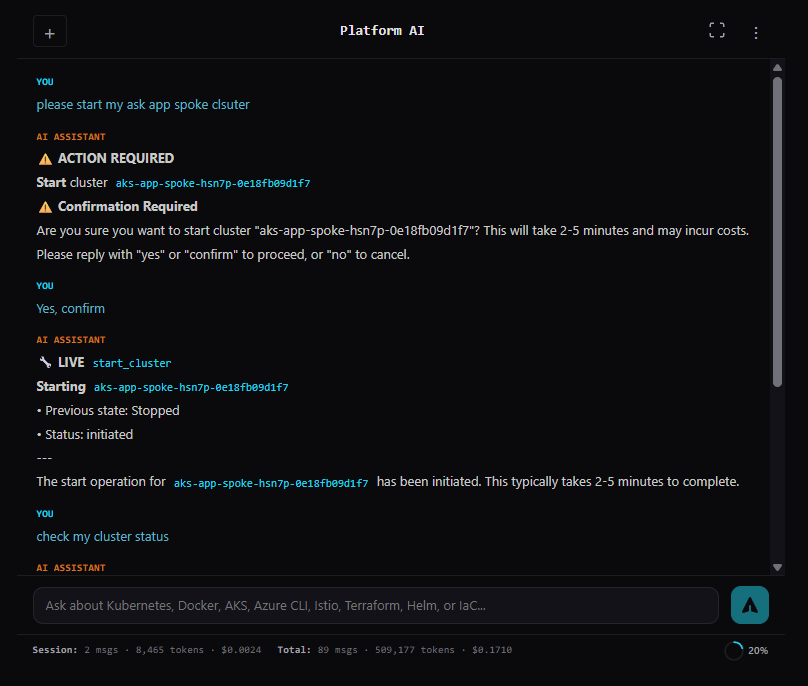
Stop operations include automatic Crossplane webhook removal. This prevents a common issue where Crossplane's validating webhooks block API calls when the cluster restarts since the webhook endpoints aren't running yet.
Smart Webhook Handling
When stopping a cluster that runs Crossplane, the Azure Function first gets the admin kubeconfig for the target cluster. It then deletes both the crossplane ValidatingWebhookConfiguration and MutatingWebhookConfiguration before proceeding with the cluster stop.
This prevents the cluster from getting stuck in a broken state on restart where the API server can't process requests because it's waiting for webhook responses from pods that aren't running yet.
The Azure Function Backend
The backend is a Node.js Azure Function that uses Managed Identity for zero-credential authentication to Azure and Kubernetes APIs.
Endpoints
The function exposes several endpoints. GET /status returns just cluster power states for quick checks. GET /full returns complete context for the AI including namespaces, apps, and XRDs. GET /inventory shows namespaces, deployments, and services. GET /argocd returns ArgoCD application sync status. GET /crossplane shows XRDs, compositions, and active claims. GET /istio returns VirtualServices and Gateways.
For operations, POST /start-cluster starts a stopped AKS cluster. POST /stop-cluster stops a running cluster with webhook cleanup. POST /get-pods lists pods with status and restart counts. POST /get-logs fetches pod container logs. POST /get-deployments lists deployments with replica status. And POST /get-events gets recent Kubernetes events.
Key Dependencies
The function uses @azure/identity with DefaultAzureCredential for Managed Identity authentication, @azure/arm-containerservice for AKS control plane operations, and @kubernetes/client-node for Kubernetes API access.
How It Works
Authentication happens automatically through DefaultAzureCredential which uses the Function App's Managed Identity. For cluster discovery, it lists all AKS clusters in the subscription via Azure Resource Manager. To access Kubernetes APIs on running clusters, it fetches the admin kubeconfig and queries directly. Start and stop operations are fire-and-forget since they take 2-5 minutes to complete.
The function collects data from multiple Kubernetes APIs in parallel:
const [inventory, argocd, crossplane, istio] = await Promise.all([
  collectInventory(kc, clusters),
  collectArgoCD(kc),
  collectCrossplane(kc),
  collectIstio(kc)
]);
No secrets are stored in code or config. The Managed Identity has Contributor access to the AKS clusters, and the Function App's system-assigned identity is granted cluster-admin via Azure RBAC.
Live Infrastructure Context
The assistant doesn't just know Kubernetes, it knows my Kubernetes. When infra context is enabled, every response is informed by my actual cluster names, resource groups, versions, and power states. It knows about my namespaces including system ones and platform namespaces for ArgoCD, Crossplane, and Istio. It sees ArgoCD app sync status, health, and destinations. It understands my Crossplane setup with XRDs, active claims, and provisioned resources. And it knows about Istio gateways, VirtualServices, and traffic routing.
Context comes from three sources with automatic fallback. First it tries live data from the Azure Function querying clusters in real-time. If that fails, it falls back to cached data in Firebase from hourly GitHub Actions snapshots. And if everything else fails, there's a hardcoded static fallback.
Scoped to DevOps
The assistant refuses off-topic questions:
"I can only help with Kubernetes, Docker, AKS, Azure CLI, Istio, Terraform, Helm, ArgoCD, Flux, and Infrastructure as Code questions. Please ask about those topics."
This keeps responses focused and prevents the model from hallucinating outside its configured expertise.
UI Features
Formatted Tool Results
Tool outputs render with visual indicators to make them easy to scan. Cluster status shows green or red power state indicators. Pod lists display namespace, status, ready count, and restart count. Deployments show replica health at a glance. Events display type icons for warnings versus normal events with truncated messages. Logs render in code blocks for easy reading. Start and stop operations show the cluster name, previous state, and webhook removal details. Errors surface clearly with warning indicators.
Context Window Management
The chat stores up to 40 messages but only sends the last 20 to Claude using a sliding window approach. A pie chart in the footer shows storage usage. Under 40 messages, the pie fills proportionally as you chat. At 40 messages, the pie fills solid blue and a compact button appears on hover. Clicking compact removes the oldest 20 messages while keeping the most recent 20.
This means I can have long conversations without constantly managing context. The API always sees recent messages, and I only need to compact occasionally.
Session Persistence
Chats persist to Firebase, keyed by a hash of the user's PAT. I can switch between conversations, delete old ones, or continue where I left off.
Security Model
Access to the API requires a Personal Access Token stored client-side. Azure authentication uses Managed Identity on the Azure Function so there are no stored credentials. Destructive actions like starting or stopping clusters require explicit user confirmation through the UI. The assistant refuses non-DevOps questions to keep it scoped. And there's per-user token tracking with visible usage stats.
What's Next
I'm thinking about adding ArgoCD sync triggers from chat, cost queries to see how much a cluster cost this month, Crossplane claim creation for provisioning infrastructure through conversation, and maybe kubectl exec support for running commands inside pods for debugging.
The foundation is set for expanding what the assistant can do while keeping the confirmation flow for anything destructive.
Enjoyed this post? Give it a clap!
- 1Platform AI Part 1: Building a Personal AI Chatbot with Claude and Cloudflare
- 2Platform AI Part 2: Adding Agentic Tool Use for AKS ManagementReading
- 3Platform AI Part 3: Building a Multi-Agent System for DevOps
- 4Platform AI Part 4: Building a Claude Code Plugin to Develop the AI Itself
Comments